Mastering WordPress User Roles: The Hidden Architecture of Site Control
WordPress user roles are the unsung backbone of any collaborative website. Without them, managing editors, clients, or contributors would be a chaotic free-for-all. These roles—often overlooked in favor of plugin installations or theme debates—dictate who can publish content, access sensitive settings, or even view private posts. The default structure (Administrator, Editor, Author, Contributor, Subscriber) may seem rigid, but custom capabilities and plugins like User Role Editor can transform this system into a precision tool for governance.
The stakes are higher than most realize. A misconfigured role can expose your site to vulnerabilities, while an over-permissive setup risks editorial conflicts. Yet, few administrators audit their role assignments beyond the initial setup. This oversight isn’t just operational—it’s a strategic blind spot. Whether you’re running a news outlet, e-commerce platform, or membership hub, understanding WordPress user roles isn’t optional; it’s foundational.
The system’s flexibility, however, is its greatest strength. From restricting plugin access for freelancers to creating granular approval workflows, these roles can be tailored to mirror real-world responsibilities. The challenge lies in balancing security with usability—especially as teams scale. Below, we dissect the mechanics, advantages, and evolving landscape of WordPress user roles, including how to future-proof your setup against emerging threats and workflow demands.
The Complete Overview of WordPress User Roles
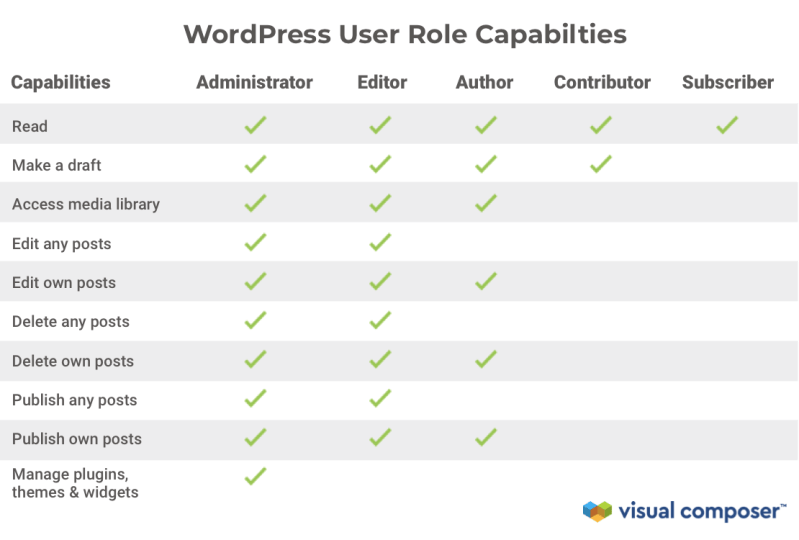
WordPress user roles function as a hierarchical access control framework, where each role is a predefined set of capabilities. These capabilities—ranging from `publish_posts` to `edit_plugins`—are mapped to specific actions, creating a matrix of permissions. The default roles serve as a starting point, but the real power lies in customization. For instance, a Contributor might be granted `edit_posts` but denied `publish_posts`, forcing content to go through an Editor’s review. This granularity is why enterprises and agencies rely on WordPress user roles to streamline workflows without sacrificing oversight.The system’s design prioritizes simplicity for solo creators while offering extensibility for complex environments. Plugins like Members or Advanced Access Manager can introduce roles like "Content Moderator" or "Affiliate," but these are built atop the core architecture. The trade-off? Over-reliance on plugins can bloat your site, while deep customization requires PHP fluency. Understanding the balance between native roles and third-party solutions is critical—especially as compliance requirements (e.g., GDPR) demand tighter control over user data access.
Historical Background and Evolution
The concept of WordPress user roles emerged in 2005 with WordPress 1.2, when Matt Mullenweg introduced the first role-based system to replace the earlier, less structured user levels. The initial roles—Administrator, Editor, Author, and Subscriber—were inspired by early blogging platforms like Movable Type, but WordPress refined them for scalability. By 2008, the Contributor role was added, addressing the need for collaborative pre-publishing workflows. These roles weren’t just administrative tools; they were a response to the growing demand for multi-author blogs and small business sites.The evolution continued with WordPress 3.0 (2010), which introduced the `wp_roles` class, allowing developers to programmatically manage roles and capabilities. This shift democratized customization, enabling agencies to build client portals or membership sites with tailored permissions. Today, the core system remains largely unchanged, but the ecosystem around it has exploded. Plugins now offer role inheritance, conditional logic, and even AI-driven permission suggestions. Yet, the core philosophy—least privilege access—endures, proving that sometimes, simplicity wins.
Core Mechanisms: How It Works
Under the hood, WordPress user roles operate through two key components: roles (high-level groupings) and capabilities (specific actions). A role is a collection of capabilities, while capabilities are hooks tied to WordPress functions. For example, the `delete_published_posts` capability is only available to Administrators and Editors. When a user attempts an action (e.g., editing a page), WordPress checks their role’s capabilities against the required permissions. If the capability exists, the action proceeds; otherwise, a 403 error is triggered.Table of Contents
- The Complete Overview of WordPress User Roles
- Historical Background and Evolution
- Core Mechanisms: How It Works
- Key Benefits and Crucial Impact
- Major Advantages
- Comparative Analysis
- Future Trends and Innovations
- Conclusion
- Comprehensive FAQs
- Q: Can I create a custom role without plugins?
- Q: How do I revoke a capability from a role?
- Q: Are there any performance impacts from too many roles?
- Q: Can roles be synced across multisite installations?
- Q: What’s the most secure way to restrict plugin access?
- Q: How do I log role-based actions for audits?
The system also supports role inheritance, where child roles (like Contributor) inherit capabilities from parent roles (Author). This modularity reduces redundancy but requires careful planning. For instance, adding `edit_users` to a custom "Team Lead" role could inadvertently grant unintended privileges. The `add_cap()` and `remove_cap()` functions in PHP allow developers to dynamically adjust capabilities, but missteps here can lead to security gaps. Understanding these mechanics is essential for auditing existing setups or designing new ones.
Key Benefits and Crucial Impact
The primary advantage of WordPress user roles is scalability without chaos. A five-person marketing team can collaborate on a site without risking accidental deletions or plugin conflicts. For agencies managing client sites, roles like "Client Editor" (with restricted plugin access) ensure projects stay on track. The system also enhances security by limiting exposure—Subscribers, for example, can’t install themes, reducing attack surfaces. These benefits extend to compliance, where role-based access logs (via plugins like WP Security Audit Log) help meet audit requirements.Beyond operational efficiency, WordPress user roles foster accountability. When every action is tied to a user’s permissions, it’s easier to track who made changes during a crisis. This transparency is invaluable for legal or reputational risks. However, the impact isn’t just defensive; it’s proactive. By aligning roles with job functions, teams can reduce friction. For example, a "Guest Author" role with only `edit_post` (for drafts) and `read_private_posts` eliminates the need for manual permission requests.
"Permission systems are the difference between a website that runs smoothly and one that becomes a liability. WordPress user roles turn collaboration into a controlled process." — Automattic Security Team
Major Advantages
- Granular Control: Assign capabilities like `edit_theme_options` to specific roles (e.g., "Design Lead") without affecting others.
- Security Hardening: Restrict access to sensitive areas (e.g., `update_core`) to Administrators only, reducing exploit risks.
- Workflow Optimization: Use roles to enforce approval chains (e.g., Contributors submit to Editors before publishing).
- Client Management: Provide clients with limited-access roles (e.g., "Content Manager") without granting full admin privileges.
- Audit Readiness: Log role-based actions to comply with regulations or internal policies.

Comparative Analysis
| Native WordPress Roles | Third-Party Role Solutions |
|---|---|
| Limited to 5 default roles; requires plugins for customization. | Supports unlimited roles (e.g., "Affiliate," "Moderator") via plugins like User Role Editor. |
| Capabilities are static; changes require code or plugin overrides. | Dynamic capabilities (e.g., time-based access) via plugins like Advanced Access Manager. |
| No built-in inheritance; roles must be manually configured. | Supports role inheritance (e.g., "Junior Editor" inherits from "Editor" but lacks `delete_posts`). |
| Basic logging via WordPress core; no advanced tracking. | Detailed audit logs (e.g., WP Security Audit Log) for compliance. |
Future Trends and Innovations
The next frontier for WordPress user roles lies in AI-driven permissioning. Imagine a system where an AI analyzes user behavior—such as a Contributor frequently editing posts—and automatically grants them `publish_posts` after a trial period. Tools like WP Fusion are already integrating role-based workflows with CRM systems, hinting at a future where permissions adapt to real-time needs. Another trend is blockchain-based verification, where roles could be tied to decentralized identities (e.g., a "Verified Expert" role for freelancers).Security will also evolve, with roles becoming more context-aware. For example, a user’s permissions might adjust based on their location (e.g., only allowing plugin updates during business hours). As WordPress embraces headless architectures, roles will need to extend beyond the admin panel to APIs and front-end interactions. The challenge will be maintaining simplicity while accommodating these innovations—balancing cutting-edge features with the platform’s core ethos of accessibility.

Conclusion
WordPress user roles are more than a technical feature—they’re a governance framework that shapes how teams interact with their sites. Whether you’re a solo creator tightening security or an enterprise aligning roles with departmental structures, the system’s flexibility is its greatest asset. The key is to start with the defaults, audit your current setup, and then layer in customizations as needed. Ignoring this architecture risks operational inefficiencies or worse, security breaches.As the platform matures, the role of WordPress user roles will only grow in importance. By staying ahead of trends—like AI-assisted permissions or decentralized access—you can future-proof your site against both technical and organizational challenges. The time to master this system isn’t when a crisis hits; it’s now, before roles become a bottleneck rather than a solution.
Comprehensive FAQs
Q: Can I create a custom role without plugins?
A: Yes. Use the `add_role()` function in your theme’s `functions.php` or a custom plugin. Example:
```php
add_role('Team Lead', 'Team Lead', array(
'edit_posts' => true,
'edit_users' => false // Explicitly deny
));
```
However, this requires PHP knowledge and may break on updates.
Q: How do I revoke a capability from a role?
A: Use `remove_cap()` in a plugin or mu-plugin:
```php
function remove_publish_from_contributors() {
$role = get_role('contributor');
$role->remove_cap('publish_posts');
}
add_action('init', 'remove_publish_from_contributors');
```
Test changes in a staging environment first.
Q: Are there any performance impacts from too many roles?
A: Indirectly. Each role adds metadata to the `wp_usermeta` table, and overly complex capability checks can slow down the admin area. Limit custom roles to essential functions and use plugins like Role Scoper for conditional logic.
Q: Can roles be synced across multisite installations?
A: Not natively. Use plugins like Multisite Role Sync or custom code with `switch_to_blog()` to replicate roles across sites. Always back up before syncing.
Q: What’s the most secure way to restrict plugin access?
A: Combine role restrictions with plugin-specific checks. For example:
1. Assign a custom role (e.g., "Client") with `manage_options` set to `false`.
2. Use the plugin’s built-in settings to further limit access (e.g., WooCommerce’s "Store Manager" role).
3. Add a capability check in the plugin’s admin page:
```php
if (!current_user_can('manage_woocommerce')) {
wp_die('Access denied.');
}
```
Q: How do I log role-based actions for audits?
A: Install WP Security Audit Log and configure it to track:
Leave a Comment
Comments are moderated before appearing. The data you submit is processed according to the Privacy Policy of Bevvy.