How Parent Portal Login Grade Tracking Transforms School Engagement
The shift from paper report cards to digital parent portal login grade tracking represents one of the most significant transformations in school-home communication. No longer confined to quarterly meetings or handwritten notes, parents now access live academic insights—grades, attendance, and teacher feedback—with just a few clicks. This evolution hasn’t just streamlined data access; it’s redefined accountability, allowing families to intervene early when academic trends dip. The ripple effect extends beyond individual households: schools report reduced administrative burdens, while districts leverage aggregated portal data to identify systemic gaps in student performance.
Yet the true power of grade tracking through parent portals lies in its ability to democratize education transparency. A decade ago, parents from affluent districts enjoyed regular progress updates; today, a free smartphone and internet access grant the same visibility to families in underserved communities. The portal’s dual role—as both a communication tool and an early warning system—has become indispensable in modern schooling. But as adoption grows, so do questions: How secure are these platforms? Can they replace human teacher-parent conferences? And what happens when technical glitches obscure critical data?
The transition from analog to digital tracking wasn’t instantaneous. Early iterations of parent portal login grade tracking systems were clunky, with lagging updates and inconsistent interfaces. Today’s platforms—powered by cloud integration, AI-driven alerts, and mobile responsiveness—have addressed those pain points. But the underlying question remains: Are schools and families fully leveraging these tools, or are they treating portals as mere grade repositories rather than dynamic engagement platforms?
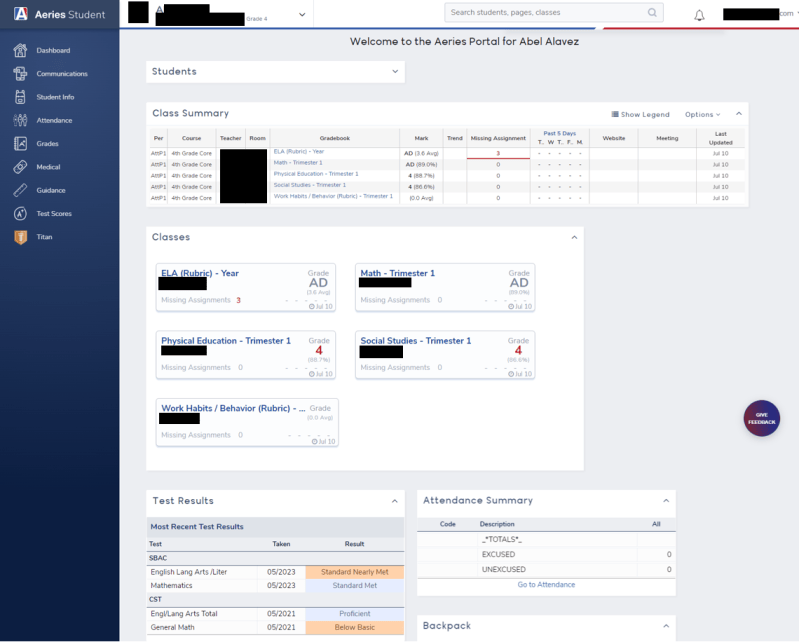
The Complete Overview of Parent Portal Login Grade Tracking
Digital parent portal login grade tracking systems serve as the backbone of modern school-home collaboration, offering real-time access to student performance metrics. Unlike traditional report cards, which provided static snapshots, today’s portals deliver continuous, granular data—from assignment scores to behavioral trends—often synchronized across multiple devices. This shift reflects broader educational technology (EdTech) trends, where institutions prioritize data-driven decision-making. For parents, the portal acts as a command center: a single dashboard to monitor progress, communicate with teachers, and set academic goals.The functionality extends beyond grades. Many portals now include attendance logs, lunch account balances, and even mental health check-ins, creating a holistic view of a student’s school experience. However, the core utility—grade tracking through parent portals—remains the most frequently utilized feature. Studies show that parents who actively engage with these tools are 30% more likely to address academic struggles before they escalate. The challenge, then, isn’t just accessing the data but interpreting it effectively and acting on insights.
Historical Background and Evolution
The origins of parent portal login grade tracking trace back to the early 2000s, when districts began replacing paper-based communication with basic online platforms. These early systems—often homegrown or third-party solutions like PowerSchool or Infinite Campus—were limited to grade books and attendance records. The technology was rudimentary: parents logged in via desktop computers, and updates were manual, leading to delays. By the mid-2010s, the rise of mobile apps and cloud storage transformed these tools into dynamic, user-friendly interfaces.A turning point came with the COVID-19 pandemic, when parent portal login grade tracking became essential for remote learning. Schools that had previously resisted digital adoption scrambled to implement portals, often integrating them with video conferencing tools. This forced evolution exposed both strengths and weaknesses: while portals enabled real-time communication, they also highlighted disparities in digital literacy among families. Today, the landscape is fragmented—some districts use proprietary systems, others rely on third-party vendors, and a few experiment with blockchain for secure data sharing.
Core Mechanisms: How It Works
At its core, grade tracking through parent portals operates on three pillars: data aggregation, role-based access, and notification systems. Teachers input grades into a centralized database, which then syncs across the portal’s interface. Parents log in using credentials provided by the school (often tied to student IDs), granting them access to their child’s specific data. The system filters information by user role—parents see grades and attendance, while teachers might access student work samples or behavioral notes.Table of Contents
- The Complete Overview of Parent Portal Login Grade Tracking
- Historical Background and Evolution
- Core Mechanisms: How It Works
- Key Benefits and Crucial Impact
- Major Advantages
- Comparative Analysis
- Future Trends and Innovations
- Conclusion
- Comprehensive FAQs
- Q: How secure are parent portal login grade tracking systems?
- Q: Can parents customize grade tracking alerts?
- Q: What should I do if my child’s grades aren’t updating in the portal?
- Q: Are there free alternatives to paid parent portals?
- Q: How can parents ensure they’re using the portal effectively?
- Q: What happens if a school doesn’t offer a parent portal?
Notifications are the engine of engagement. Portals now employ AI to flag declining grades, missed assignments, or attendance patterns, sending alerts via email or SMS. Some advanced systems even integrate with calendar apps, allowing parents to schedule interventions. The technical backbone varies: smaller schools may use simple database-driven portals, while larger districts deploy enterprise solutions with API integrations for third-party apps. Security is paramount—multi-factor authentication and encryption standards protect sensitive data, though breaches remain a concern in an era of rising cyber threats.
Key Benefits and Crucial Impact
The adoption of parent portal login grade tracking has reshaped educational ecosystems, offering tangible benefits for students, parents, and schools alike. For families, the ability to monitor progress daily eliminates the guesswork of waiting for report cards. Teachers benefit from reduced administrative overhead, freeing time for instruction. Districts gain valuable data analytics to identify trends—such as which grade levels struggle with math or where dropout risks are highest. The cumulative effect is a more responsive, data-informed educational system.Yet the impact isn’t just operational; it’s cultural. Portals have redefined the parent-teacher relationship, shifting it from periodic check-ins to continuous collaboration. When a parent spots a drop in grades, they can reach out within hours rather than weeks. This immediacy fosters trust and reduces the stigma around academic struggles. As one education administrator noted:
“Before portals, we’d hear from parents only when problems were severe. Now, we’re partners in real-time—catching issues before they become crises.”
—Dr. Elena Vasquez, Superintendent of Riverside Unified School District
Major Advantages
- Real-Time Transparency: Parents receive instant updates on grades, assignments, and teacher feedback, eliminating delays in communication.
- Proactive Intervention: AI-driven alerts notify families of declining performance, enabling timely support before grades suffer.
- Reduced Administrative Burden: Schools automate grade distribution and parent notifications, saving hours of manual labor.
- Data-Driven Decision Making: Districts analyze portal trends to allocate resources (e.g., tutoring programs) where they’re needed most.
- Accessibility and Inclusion: Digital portals break geographic and socioeconomic barriers, ensuring all families have equal access to academic insights.

Comparative Analysis
Not all parent portal login grade tracking systems are equal. Below is a comparison of four leading platforms based on key features:| Feature | PowerSchool | Infinite Campus | Skyward | Homeroom (Google) |
|---|---|---|---|---|
| Grade Tracking | Comprehensive, with category-weighted grades and teacher comments. | Detailed breakdowns, including extra credit and re-assessment options. | Customizable grade books with progress tracking over time. | Seamless Google Classroom integration; limited to assignment scores. |
| Mobile Access | Dedicated app with push notifications. | App and responsive web design; SMS alerts. | App with offline access for rural areas. | Native Google app integration; no separate portal. |
| Security | Multi-factor auth, role-based permissions, and encryption. | Enterprise-grade security with audit logs. | Compliant with FERPA; regular third-party audits. | Google’s security infrastructure; limited customization. |
Cost
| District-based pricing ($2–$5 per student/year). |
Similar to PowerSchool; some schools negotiate bulk discounts. |
Higher upfront cost but scalable for large districts. |
Free for Google Workspace for Education users. |
|
Future Trends and Innovations
The next generation of parent portal login grade tracking will likely focus on personalization and predictive analytics. Current systems track past performance; future portals may use machine learning to forecast which students are at risk of failing based on behavior patterns. Imagine a portal that not only shows grades but also suggests personalized study plans or connects families with local tutors. Another trend is the integration of mental health metrics—tracking stress levels via survey data or attendance spikes—to provide holistic student support.Blockchain technology could also revolutionize grade tracking through parent portals by creating tamper-proof records. Parents would have immutable access to their child’s academic history, reducing disputes over grades or attendance. Meanwhile, voice-assisted portals (via Alexa or Siri) may emerge, allowing parents to ask, “What’s my child’s math grade this quarter?” and receive an instant response. The challenge will be balancing innovation with usability—ensuring these advancements don’t overwhelm families already juggling work and school demands.

Conclusion
The adoption of parent portal login grade tracking marks a pivotal moment in education, where technology bridges the gap between schools and homes. While the tools exist, their effectiveness hinges on two factors: consistent use by parents and teachers, and continuous improvement by districts. The platforms of tomorrow will do more than track grades—they’ll anticipate needs, connect resources, and foster collaboration. For now, the focus remains on maximizing today’s systems: ensuring every login leads to action, every alert sparks a conversation, and every grade becomes a stepping stone toward success.As schools refine their grade tracking through parent portals, the broader question lingers: Can digital tools replace the human element of education? The answer lies in balance. Portals provide the data; teachers and parents provide the context. Together, they create a system where no student falls through the cracks—and no family is left in the dark.
Comprehensive FAQs
Q: How secure are parent portal login grade tracking systems?
Most portals use encryption, multi-factor authentication, and compliance with laws like FERPA (U.S.) to protect student data. However, security risks persist, such as phishing attacks or weak passwords. Schools should enforce regular password updates and monitor login attempts for suspicious activity.
Q: Can parents customize grade tracking alerts?
Many portals allow parents to set preferences for alerts (e.g., notifications only for grades below C or missed assignments). Some systems, like PowerSchool, let users choose delivery methods (email, SMS, or app push). Always check your school’s specific portal settings.
Q: What should I do if my child’s grades aren’t updating in the portal?
First, verify with your child’s teacher that grades were entered correctly. If the issue persists, contact your school’s IT or portal support team. Some delays occur due to sync issues, especially if the portal is integrated with multiple systems (e.g., Google Classroom). Provide screenshots of the error for faster troubleshooting.
Q: Are there free alternatives to paid parent portals?
Yes. Google’s Homeroom (for Google Workspace for Education users) is free, though it lacks some advanced features. Open-source options like Moodle (with plugins) or district-specific free tools may also be available. However, these often require technical setup and may lack robust customer support.
Q: How can parents ensure they’re using the portal effectively?
Start by scheduling a demo with your school’s tech team to understand the portal’s features. Set up alerts for key metrics (e.g., weekly grade drops). Use the portal to proactively check in with teachers—even a quick note like “Noticed a drop in science; can we discuss strategies?” can make a difference. Treat the portal as a tool for collaboration, not just monitoring.
Q: What happens if a school doesn’t offer a parent portal?
Advocate for change by joining parent groups or school boards to request digital communication tools. If the school cites budget constraints, propose partnerships with EdTech nonprofits or local colleges that may offer discounted or free portal solutions. In the interim, request regular email updates from teachers or attend virtual parent-teacher conferences.
Leave a Comment
Comments are moderated before appearing. The data you submit is processed according to the Privacy Policy of Bevvy.