The Best Free Music Production Software in 2024: Power Without Paywalls
The music industry’s democratization has made free music production software not just a niche curiosity but a cornerstone of modern sound creation. No longer confined to studios with six-figure budgets, artists, producers, and hobbyists now wield tools that rival commercial giants—without spending a dime. The shift began with open-source movements in the early 2000s, accelerated by cloud-based collaboration, and now stands as a testament to how technology can dismantle traditional barriers. Today, the question isn’t whether you can produce professional music for free, but which tools will best fit your workflow, genre, and creative ambitions.
Yet, the landscape is fragmented. Some free music production software solutions prioritize raw functionality, offering DAWs with multi-track editing and VST support, while others focus on niche applications—like synth design or field recording. The trade-offs are real: limited plugin compatibility, fewer stock sounds, or clunky interfaces. But the payoff—unlocking creativity without financial constraints—is undeniable. For independent artists, this means experimenting with orchestral scores or electronic textures without the pressure of licensing fees. For educators, it’s a gateway to teaching production fundamentals. And for engineers, it’s a playground to test workflows before investing in premium tools.
The challenge lies in curation. Not all free music production software is created equal. Some are stripped-down versions of paid suites, others are full-featured alternatives built from the ground up. The best options strike a balance: robust enough for serious work, flexible enough for experimentation, and community-supported enough to ensure longevity. Below, we dissect the mechanics, benefits, and future of these tools—so you can make an informed choice without compromising on quality.

The Complete Overview of Free Music Production Software
Free music production software has evolved from a novelty to a viable alternative for professionals and beginners alike. The core appeal lies in accessibility: removing the financial hurdle allows creators to focus on sound design, arrangement, and innovation rather than licensing costs. These tools often mirror the functionality of paid DAWs, complete with MIDI sequencing, audio editing, and virtual instruments—though with trade-offs in plugin ecosystems or advanced mixing features. The rise of open-source development and corporate-backed free tiers (like Ableton’s introductory offer) has further blurred the lines between "free" and "prosumer" tools.The market now offers three primary categories: full-featured DAWs (e.g., Cakewalk, LMMS), specialized free plugins (e.g., Vital, Surge), and cloud-based collaborative tools (e.g., Soundtrap). Each serves distinct needs—whether you’re composing a full album, designing custom synths, or collaborating remotely. The key distinction today is no longer whether these tools can replace paid software but how they integrate into existing workflows. For instance, a producer using free music production software for sound design might later upgrade to a paid synth for final mixing, creating a hybrid pipeline that maximizes resources.
Historical Background and Evolution
The origins of free music production software trace back to the late 1990s and early 2000s, when open-source communities began developing audio tools as alternatives to proprietary systems. Projects like Audacity (2000) and Ardour (2003) emerged from a need for affordable, non-linear editing solutions, catering to podcasters and indie musicians. Meanwhile, Linux-based DAWs like Rosegarden and Qtractor gained traction among technically inclined users, proving that professional audio workflows didn’t require expensive hardware or software.The turning point came in the 2010s with the proliferation of free music production software that mimicked commercial DAWs. LMMS (originally Linux MultiMedia Studio) and Cakewalk by BandLab (a free version of Sonar) introduced drag-and-drop interfaces, virtual instruments, and mixer channels—features once exclusive to paid suites. Corporate players also entered the fray: Ableton Live Lite, FL Studio Fruity Edition, and GarageBand (for macOS/iOS) offered free tiers with watered-down but functional capabilities. This era marked a shift from "free as in speech" (open-source) to "free as in beer" (freemium models), broadening the tool’s appeal to non-technical users.
Core Mechanisms: How It Works
At its core, free music production software operates on the same principles as paid DAWs: arranging audio and MIDI tracks, applying effects, and mixing down to a final output. The difference lies in implementation. Open-source tools like Ardour or Qtractor rely on community-driven development, often prioritizing stability and customization over polished UX. In contrast, freemium DAWs (e.g., FL Studio Producer Edition) offer streamlined interfaces with built-in plugins, mimicking the workflow of their paid counterparts.Table of Contents
- The Complete Overview of Free Music Production Software
- Historical Background and Evolution
- Core Mechanisms: How It Works
- Key Benefits and Crucial Impact
- Major Advantages
- Comparative Analysis
- Future Trends and Innovations
- Conclusion
- Comprehensive FAQs
- Q: Can I use free music production software for professional projects?
- Q: Are there any hidden costs with free music production software?
- Q: Which free DAW is best for beginners?
- Q: Can I collaborate with others using free music production software?
- Q: How do I get better sounds in free music production software?
- Q: Is free music production software safe from malware?
The mechanics vary by tool type:
The trade-off? Some free music production software lacks proprietary plugin support or advanced mixing features, forcing users to rely on community-made assets or workarounds. However, modern cloud-based solutions (like BandLab’s online DAW) mitigate this by offering browser-based workflows with minimal setup.
Key Benefits and Crucial Impact
The most immediate advantage of free music production software is cost elimination. For artists on tight budgets, this means allocating funds to gear, marketing, or further education instead of licensing fees. Beyond finances, these tools foster creativity by removing the pressure to "keep up" with industry standards. A bedroom producer can experiment with orchestral libraries or experimental synths without fear of sunk costs—knowledge that was once reserved for those with deep pockets.The impact extends to education and accessibility. Schools and non-profits now teach production using free music production software, democratizing skills that were once gatekept by expensive software. Collaborative tools like Soundtrap or BandLab also lower barriers for remote teams, enabling global projects without physical studios. Even professionals use these tools for prototyping or side projects, treating them as "sandboxes" for ideas before committing to paid software.
> "The best free tools aren’t just about saving money—they’re about redefining what’s possible when the only limit is imagination." — Andrew Huang, Music Producer & Educator
Major Advantages
- Zero Financial Barrier: Produce, mix, and master music without upfront costs, ideal for beginners or side projects.
- Cross-Platform Compatibility: Most free music production software runs on Windows, macOS, and Linux, with some offering mobile/online versions (e.g., GarageBand, Soundtrap).
- Plugin and Asset Libraries: Tools like Vital or Surge provide high-quality synths, while DAWs often include stock loops and samples (e.g., FL Studio’s free plugins).
- Community Support: Open-source projects benefit from active forums (e.g., Ardour’s user manual, LMMS’s Discord), offering troubleshooting and customization tips.
- Hybrid Workflows: Many free tools integrate with paid software (e.g., exporting MIDI to Ableton Live or Logic Pro), creating flexible pipelines.
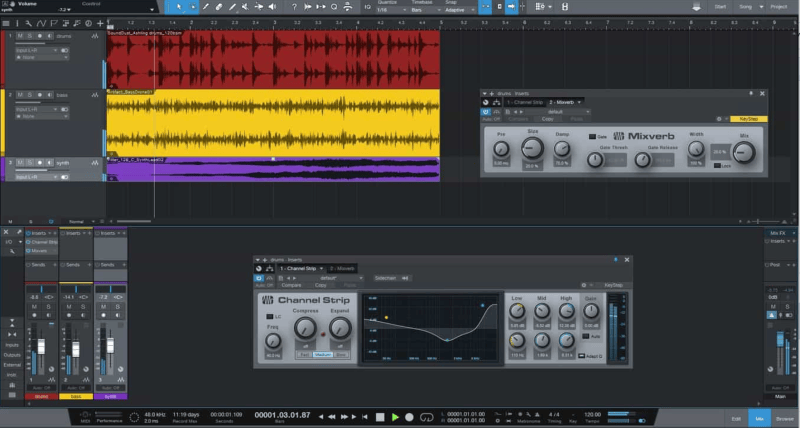
Comparative Analysis
| Tool | Best For |
|---|---|
| Cakewalk by BandLab | Full-featured DAW with VST support; ideal for electronic/production music (Windows-only). |
| LMMS | Beginner-friendly with built-in instruments; great for hip-hop/EDM (cross-platform). |
| Ardour | Professional audio editing and mixing (Linux/macOS; steeper learning curve). |
| Vital | Serum-like wavetable synth with free parameters (standalone or VST). |
Future Trends and Innovations
The next frontier for free music production software lies in AI integration and cloud-native workflows. Tools like AIVA (AI composition) and Soundraw (AI-assisted production) are pushing boundaries, though they’re not yet fully free. Expect more freemium DAWs to adopt subscription models with tiered features, blurring the line between free and paid. Open-source projects may also see advancements in real-time collaboration, mimicking tools like Splice or Soundtrap but with decentralized hosting.Another trend is hardware integration: free software increasingly supports MIDI controllers and audio interfaces (e.g., Cakewalk’s ASIO compatibility). As quantum computing enters audio processing, we may see free music production software leveraging parallel processing for faster rendering—though this is still speculative. For now, the focus remains on refining UX and expanding plugin ecosystems to rival paid alternatives.

Conclusion
Free music production software has transcended its "budget option" label to become a legitimate force in modern music creation. The tools available today—whether DAWs, synths, or collaborative platforms—offer functionality that would have been unimaginable a decade ago. The key to leveraging them lies in understanding their strengths: some excel in workflow simplicity (LMMS), others in professional-grade editing (Ardour), and a few in niche sound design (Vital). The future points toward even greater integration with AI, cloud collaboration, and hardware, but the core principle remains unchanged: creativity should not be constrained by cost.For artists, the message is clear: free music production software is no longer a compromise but a canvas. The only limit is your imagination—and the tools to bring it to life are already at your fingertips.
Comprehensive FAQs
Q: Can I use free music production software for professional projects?
A: Yes, many professionals use free music production software for demos, side projects, or as part of a hybrid workflow. Tools like Cakewalk and Ardour are used in commercial studios, though advanced mixing may require paid plugins. Always check licensing for final distribution (e.g., some free samples may have usage restrictions).
Q: Are there any hidden costs with free music production software?
A: Most free music production software is genuinely free, but watch for:
Q: Which free DAW is best for beginners?
A: LMMS and Cakewalk are beginner-friendly due to their intuitive interfaces and built-in instruments. GarageBand (macOS/iOS) is also excellent for beginners, though platform-locked. Avoid Ardour or Qtractor as a first tool—they’re designed for advanced users.
Q: Can I collaborate with others using free music production software?
A: Yes, cloud-based tools like Soundtrap and BandLab enable real-time collaboration. For offline work, Cakewalk and Ardour support file sharing, though version control requires manual syncing. Some free plugins (e.g., Vital) can also be shared via project files.
Q: How do I get better sounds in free music production software?
A: Free tools often lack stock sounds, but you can:
Q: Is free music production software safe from malware?
A: Most reputable free tools (e.g., LMMS, Ardour) are open-source and regularly audited. However, always download from official sites (e.g., GitHub, developer’s website) to avoid malware. Avoid "cracked" versions of paid software—these often contain viruses.
Leave a Comment
Comments are moderated before appearing. The data you submit is processed according to the Privacy Policy of Bevvy.