How to Verify Your Apple Warranty Coverage: The Definitive Apple Warranty Check Guide
Apple’s warranty system is a critical safeguard for millions of users worldwide, yet many remain unclear about how to validate their coverage. Whether you’re troubleshooting a malfunctioning device or preparing for a repair, knowing how to conduct an apple warranty check can save time, money, and frustration. The process is straightforward, but nuances—such as eligibility criteria, regional differences, and the distinction between AppleCare+ and standard warranties—often complicate matters. Without proper verification, users risk voiding coverage or paying for repairs that should be covered.
The stakes are higher than ever. Apple’s ecosystem of devices, from iPhones to MacBooks, commands a premium price tag, making warranty validation a non-negotiable step for owners. A single misstep—like assuming a third-party repair preserves coverage—can leave users exposed to unexpected expenses. Even Apple’s own support channels sometimes lack clarity, forcing consumers to navigate a maze of serial numbers, purchase dates, and service provider details. The ambiguity underscores the need for a precise, step-by-step breakdown of how to perform an apple warranty check—one that accounts for both hardware and software-related claims.
The Complete Overview of Apple’s Warranty System
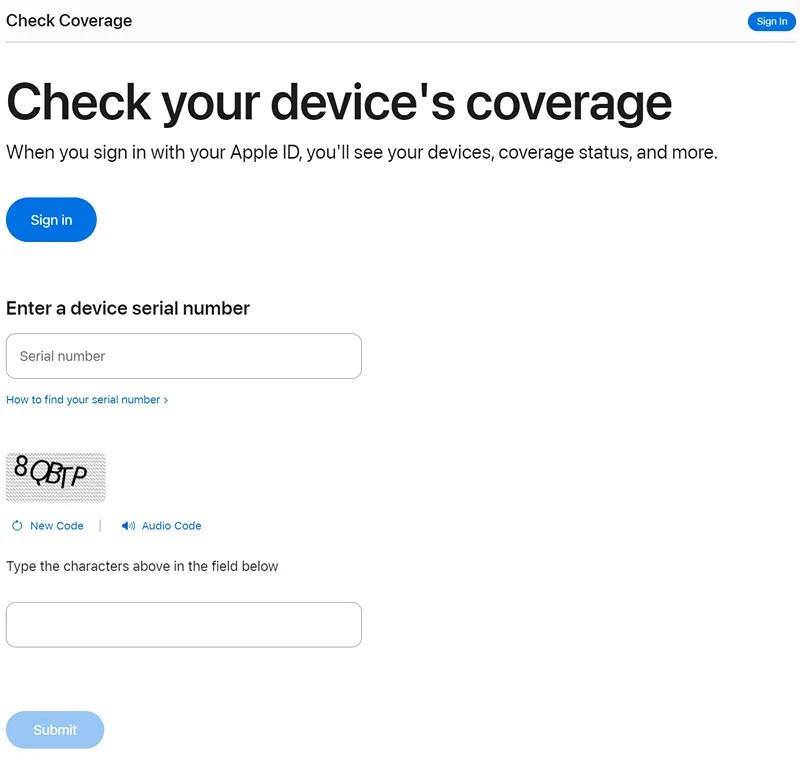
Apple’s warranty framework is designed to balance consumer protection with operational efficiency, but its complexity often leaves users questioning whether their device qualifies for support. At its core, the system revolves around two primary pillars: the limited warranty that comes standard with every Apple product and the optional AppleCare+, which extends coverage for hardware and accidental damage. The apple warranty check process is the gateway to determining eligibility, but it’s not a one-size-fits-all solution. Factors like the device’s original purchase location, transfer history, and even the nature of the issue (e.g., liquid damage vs. accidental drops) can alter outcomes.What many users overlook is that Apple’s warranty isn’t just about hardware defects—it also covers software-related issues, provided they’re tied to a genuine Apple product and not the result of unauthorized modifications. For example, an iPhone that freezes due to a software glitch may qualify for a repair under warranty, but the same device with a cracked screen from a fall won’t unless AppleCare+ was purchased. This distinction is why a thorough apple warranty verification is essential before seeking repairs. The process involves cross-referencing the device’s serial number with Apple’s internal databases, which track everything from manufacturing dates to prior service claims.
Historical Background and Evolution
Apple’s warranty policies have evolved alongside its product lineup, reflecting shifts in consumer expectations and technological advancements. In the early 2000s, Apple’s warranty was a straightforward affair: a one-year limited warranty on hardware defects, with no options for extended coverage. As the company’s devices became more sophisticated—and expensive—the need for comprehensive protection grew. The introduction of AppleCare+ in 2011 marked a turning point, offering users the ability to extend their warranty for two additional years while adding coverage for accidental damage, albeit at a premium.The apple warranty check process itself has also adapted. Initially, users had to call Apple Support or visit an authorized service provider to verify coverage, a time-consuming method prone to errors. Today, Apple’s online tools—such as the Apple Coverage Checker—allow users to input their device’s serial number and receive instant results. This shift toward digital verification aligns with Apple’s broader strategy of streamlining customer service through self-service platforms. However, the transition hasn’t been flawless. Older devices or those purchased through third-party retailers sometimes trigger discrepancies, forcing users to engage in additional verification steps, such as providing proof of purchase.
Core Mechanisms: How It Works
The apple warranty check relies on a combination of hardware identification and Apple’s internal service records. When you initiate a check, the system pulls data from the device’s serial number, a unique alphanumeric code embedded in every Apple product. This number links to the device’s manufacturing details, purchase date, and any prior service interactions. For AppleCare+ claims, the system also checks whether the extended warranty was activated and whether the device has exceeded the number of allowable service incidents (typically two for accidental damage under AppleCare+).What often trips up users is the distinction between Apple’s limited warranty and AppleCare+. The former covers manufacturing defects for one year from the purchase date (or original activation date for cellular models) and two years for Apple-branded batteries. AppleCare+, on the other hand, extends this coverage to two years from purchase and includes accidental damage protection. During an apple warranty verification, the system will clearly indicate which type of coverage applies, along with any remaining incidents or exclusions (e.g., damage from unauthorized repairs).
Key Benefits and Crucial Impact
Understanding how to perform an apple warranty check isn’t just about avoiding unexpected repair costs—it’s about leveraging a system designed to maximize the lifespan of high-value devices. For businesses and individuals alike, warranty coverage can mean the difference between a minor inconvenience and a significant financial setback. Apple’s policies are particularly advantageous for users in regions with limited access to authorized service providers, as the apple warranty verification process can be completed remotely, reducing the need for in-person visits.Table of Contents
- The Complete Overview of Apple’s Warranty System
- Historical Background and Evolution
- Core Mechanisms: How It Works
- Key Benefits and Crucial Impact
- Major Advantages
- Comparative Analysis
- Future Trends and Innovations
- Conclusion
- Comprehensive FAQs
- Q: How do I perform an apple warranty check for my device?
- Q: Does an apple warranty check work for third-party purchases?
- Q: Can I transfer AppleCare+ to a new owner?
- Q: What happens if I open my device myself and it’s under warranty?
- Q: How many accidental damage claims does AppleCare+ allow?
- Q: Does Apple’s warranty cover liquid damage?
- Q: Can I check my warranty status without the original box?
- Q: What if my apple warranty check shows no coverage?
- Q: Are there regional differences in warranty policies?
- Q: How long does it take to get a warranty claim approved?
The impact of proper warranty management extends beyond individual users. Companies that deploy Apple devices across teams often integrate apple warranty checks into their IT asset management workflows, ensuring compliance and optimizing repair cycles. Even for casual users, the peace of mind that comes from knowing their device is covered is invaluable. Without this knowledge, the risk of voiding coverage—whether through unauthorized repairs or failing to meet claim deadlines—becomes a constant concern.
> "Apple’s warranty system is a testament to how product design and consumer protection can align seamlessly. The key to unlocking its full value lies in understanding the verification process before a problem arises." — Tech Policy Analyst, 2024
Major Advantages
- Instant Verification: Apple’s online tools provide real-time results for apple warranty checks, eliminating the need for phone calls or in-person visits.
- Global Coverage: Warranty eligibility is determined by the device’s serial number, not the user’s location, making it accessible worldwide.
- Accidental Damage Protection (AppleCare+): Extends coverage to incidents like drops, spills, and cracks, significantly reducing out-of-pocket repair costs.
- Software Support: Covers issues arising from Apple’s operating system updates, ensuring users aren’t penalized for software-related malfunctions.
- Transferable Coverage: AppleCare+ can be transferred to a new owner if the device is sold, preserving its value.

Comparative Analysis
| Feature | Apple’s Limited Warranty | AppleCare+ |
|---|---|---|
| Duration | 1 year (hardware), 2 years (battery) | 2 years from purchase |
| Coverage Scope | Manufacturing defects only | Defects + accidental damage (with limits) |
| Cost | Included with purchase | Paid add-on (varies by device) |
| Service Incidents | Unlimited (for defects) | Typically 2 per incident type |
Future Trends and Innovations
As Apple continues to refine its warranty model, several trends are likely to shape the future of apple warranty checks. First, the integration of AI-driven diagnostics could streamline the verification process, allowing users to upload photos or describe issues for instant eligibility assessments. Second, Apple may expand its warranty coverage to include emerging risks, such as damage from extreme weather events or cyber-physical threats (e.g., malware-induced hardware failures). Additionally, the rise of refurbished and trade-in devices could introduce new layers to the apple warranty verification process, requiring clearer guidelines on transferred coverage.Another potential development is the automation of warranty claims through Apple’s ecosystem. Imagine a scenario where an iPhone automatically detects a hardware issue and initiates a warranty check before notifying the user—eliminating the need for manual intervention. While this level of integration raises privacy concerns, it could significantly reduce friction in the apple warranty check workflow. For now, users must rely on existing tools, but the trajectory suggests a future where warranty management is seamless, predictive, and deeply embedded in Apple’s hardware and software.

Conclusion
The apple warranty check is more than a procedural step—it’s a critical tool for preserving the value of Apple’s premium devices. By mastering the verification process, users can avoid common pitfalls, such as voided coverage or delayed repairs, while maximizing the benefits of their warranty. Whether you’re a business managing a fleet of MacBooks or an individual protecting an iPhone, understanding the nuances of Apple’s policies ensures that you’re always covered when it matters most.As Apple’s products evolve, so too will its warranty framework. Staying informed about updates—whether through official announcements or trusted sources—will be key to maintaining seamless access to support. For now, the apple warranty verification process remains one of the most reliable ways to safeguard your investment, and with the right knowledge, it’s a process anyone can navigate with confidence.
Comprehensive FAQs
Q: How do I perform an apple warranty check for my device?
A: Visit Apple’s official Coverage Checker and enter your device’s serial number (found in Settings > General > About or on the original packaging). The system will display warranty status, remaining incidents (if applicable), and coverage details.
Q: Does an apple warranty check work for third-party purchases?
A: Yes, but only if the device was originally purchased from an authorized Apple retailer or carrier. Third-party sellers may not have access to Apple’s service records, so you’ll need proof of purchase (receipt or order confirmation) to verify coverage.
Q: Can I transfer AppleCare+ to a new owner?
A: Yes, AppleCare+ is transferable to a new owner if the device is sold. The new owner can use their own Apple ID to claim the remaining coverage by providing the original purchase details and the device’s serial number.
Q: What happens if I open my device myself and it’s under warranty?
A: Apple’s warranty is voided if the device is opened or repaired by an unauthorized party. Always use Apple’s certified service providers or Apple Stores to avoid coverage issues during an apple warranty verification.
Q: How many accidental damage claims does AppleCare+ allow?
A: AppleCare+ typically allows two service incidents per accidental damage claim type (e.g., cracked screen, water damage) during the coverage period. Exceeding this limit may result in out-of-pocket repairs.
Q: Does Apple’s warranty cover liquid damage?
A: No, the standard warranty does not cover liquid damage. However, AppleCare+ includes accidental damage coverage, which may apply if the device was not submerged for extended periods (e.g., a spilled drink vs. a dropped phone in water). Always check during an apple warranty check for specifics.
Q: Can I check my warranty status without the original box?
A: Yes, the serial number is sufficient for an apple warranty check. You can find it in your Apple ID account, the device’s settings, or by contacting Apple Support with alternative proof of purchase.
Q: What if my apple warranty check shows no coverage?
A: If the check indicates no coverage, review the purchase date, serial number, and whether AppleCare+ was added. If you believe there’s an error, contact Apple Support with documentation (receipts, order confirmations) to dispute the result.
Q: Are there regional differences in warranty policies?
A: Yes, warranty terms can vary by country. For example, some regions offer longer battery warranties or additional software support. Always confirm during an apple warranty verification or consult Apple’s local support site for region-specific details.
Q: How long does it take to get a warranty claim approved?
A: Most apple warranty checks and claims are processed instantly online, but in-store or mail-in repairs may take 1–5 business days for diagnostics. Complex cases (e.g., battery replacements) may require additional time.
Leave a Comment
Comments are moderated before appearing. The data you submit is processed according to the Privacy Policy of Bevvy.