How to Choose the Best App Maker in 2024: A Strategic Guide
The decision to build an app—whether for internal operations, customer engagement, or revenue generation—is no longer just about technical feasibility. It’s about aligning your vision with the right tool, one that balances ease of use, scalability, and cost without compromising functionality. The market for app makers has exploded, offering solutions that cater to hobbyists, startups, and enterprises alike. But not all platforms deliver on their promises. Some prioritize drag-and-drop simplicity at the expense of customization, while others bury advanced features behind steep learning curves or hidden fees. The key lies in understanding what your project demands before selecting a tool, not the other way around.
The stakes are higher than ever. A poorly chosen app maker can lead to bloated development timelines, limited scalability, or even security vulnerabilities. Conversely, the right platform accelerates time-to-market, reduces dependency on specialized developers, and future-proofs your solution. The challenge? Cutting through the noise. With over 200 no-code and low-code platforms vying for attention, each claiming to be the "best app maker," the real question is: Which one aligns with your specific needs? The answer requires a structured approach—one that evaluates technical capabilities, integration potential, and long-term viability.
This guide cuts through the hype to provide a data-driven framework for selecting the best app maker. We’ll dissect the evolution of these tools, their underlying mechanics, and the critical factors that distinguish industry leaders from niche players. Whether you’re a non-technical founder, a product manager, or a developer seeking to streamline workflows, the insights here will help you avoid costly missteps and build with confidence.
The Complete Overview of Choosing the Best App Maker
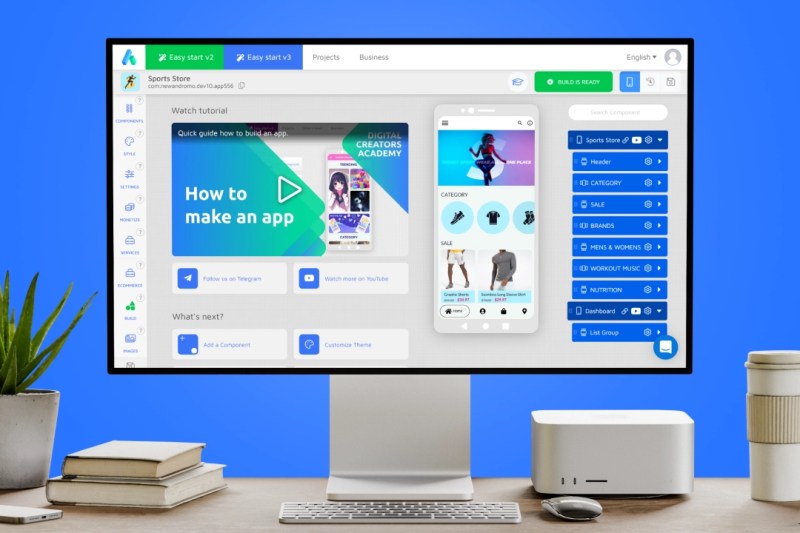
The modern app maker landscape is defined by two competing forces: accessibility and sophistication. On one end, platforms like Glide and Adalo democratize app creation, allowing users with minimal coding experience to prototype and deploy functional apps in hours. On the other, enterprise-grade tools like OutSystems and Mendix offer deep customization, robust security, and seamless integration with legacy systems—but at the cost of complexity and higher entry barriers. The tension between these extremes has given rise to a hybrid category of platforms that blend intuitive interfaces with advanced capabilities, such as Bubble and FlutterFlow. Understanding this spectrum is the first step in narrowing down options.The "best app maker" isn’t a one-size-fits-all designation. It’s a dynamic label that shifts based on context—whether you prioritize speed, scalability, or design flexibility. For instance, a startup testing a minimum viable product (MVP) might favor a low-code platform with built-in analytics, while a financial institution building a compliance-heavy application would demand a solution with SOC 2 certification and audit trails. The absence of a universal standard means your selection process must be tailored to three non-negotiable criteria: project scope, technical constraints, and budget. Ignore any of these, and you risk overpaying for features you’ll never use or underdelivering on critical functionalities.
Historical Background and Evolution
The origins of modern app makers trace back to the early 2010s, when platforms like MIT’s App Inventor and Zapier began simplifying workflow automation for non-developers. These tools were rudimentary by today’s standards, but they proved a pivotal proof of concept: complex software could be abstracted into visual interfaces. The real inflection point came in 2015–2017, when companies like Bubble and Airtable introduced cloud-based, drag-and-drop builders that could handle full-stack applications—front-end, back-end, and databases—without requiring a single line of code. This shift marked the birth of the "no-code revolution," democratizing app development for entrepreneurs and small teams.The evolution hasn’t been linear. Early adopters quickly hit limitations: poor performance at scale, limited API integrations, and proprietary data structures that locked users into single platforms. In response, the second wave of app makers—led by tools like FlutterFlow and Softr—focused on bridging the gap between no-code simplicity and developer-level control. These platforms introduced hybrid approaches, allowing users to embed custom code where needed while retaining drag-and-drop flexibility. Meanwhile, enterprise players like Microsoft Power Apps and Salesforce Lightning expanded their offerings to include governance, compliance, and multi-cloud deployments. The result? A fragmented but rapidly maturing ecosystem where the "best app maker" depends entirely on the use case.
Core Mechanisms: How It Works
At their core, app makers function as visual abstraction layers over traditional software stacks. They achieve this through three interconnected systems: component libraries, logic engines, and deployment pipelines. Component libraries provide pre-built UI elements (buttons, forms, databases) that users drag and drop onto a canvas. Logic engines—often powered by workflow automation or JavaScript-like scripting—handle data processing, conditional logic, and API calls. Finally, deployment pipelines automate the build, test, and release process, ensuring consistency across platforms (web, iOS, Android).Table of Contents
- The Complete Overview of Choosing the Best App Maker
- Historical Background and Evolution
- Core Mechanisms: How It Works
- Key Benefits and Crucial Impact
- Major Advantages
- Comparative Analysis
- Future Trends and Innovations
- Conclusion
- Comprehensive FAQs
- Q: Can I migrate my app from one platform to another if I outgrow it?
- Q: Are app makers secure enough for handling sensitive data (e.g., payments, healthcare)?
- Q: How do I estimate the total cost of ownership (TCO) for an app maker?
- Q: What’s the learning curve like for non-technical users?
- Q: Can I hire a developer to extend my no-code app later?
The magic happens in the backend, where these platforms abstract away the complexity of servers, databases, and networking. For example, a tool like Adalo might automatically provision a Firebase backend when you create a user authentication flow, while a platform like AppSheet could sync data directly with Google Sheets. However, this abstraction comes with trade-offs. Some app makers restrict you to their proprietary infrastructure, limiting portability. Others, like FlutterFlow, generate native code (Dart/Flutter) that you can export and host independently. Understanding these mechanics helps you assess whether a platform’s strengths align with your long-term needs.
Key Benefits and Crucial Impact
The primary allure of app makers lies in their ability to compress development timelines from months to days. For teams with limited technical resources, this efficiency translates directly to cost savings and faster validation of business hypotheses. Studies show that no-code tools can reduce development costs by up to 70% for simple applications, while low-code platforms like OutSystems deliver a 50% productivity boost for enterprise teams. Beyond speed, these platforms enable rapid iteration—a critical advantage in markets where user feedback can pivot a product’s direction overnight.Yet the impact extends beyond operational efficiency. App makers are reshaping organizational dynamics by empowering non-technical stakeholders to contribute directly to digital product development. Marketing teams can build landing pages and lead-capture apps without IT bottlenecks. Customer support teams can prototype internal tools to streamline workflows. This shift decentralizes power, fostering a culture of innovation where ideas aren’t delayed by resource constraints. The caveat? Success hinges on clear governance—without it, shadow IT risks proliferate, and technical debt accumulates.
"The best app makers don’t just build software; they rebuild how teams collaborate. The question isn’t whether to adopt them, but how to integrate them without losing control over quality and security." — Jane Friedman, Tech Productivity Consultant
Major Advantages
- Speed to Market: Deploy functional prototypes in days, not months, with minimal upfront investment. Ideal for MVPs, internal tools, and experimental features.
- Cost Efficiency: Eliminate the need for full-stack developers for 80% of common use cases, reducing labor costs and outsourcing dependencies.
- Scalability: Enterprise-grade platforms (e.g., OutSystems, Mendix) support thousands of users and complex workflows, while lighter tools (e.g., Glide) scale to niche audiences.
- Cross-Platform Compatibility: Build once, deploy across web, iOS, and Android without rewriting code (e.g., FlutterFlow, Adalo).
- Integration Ecosystems: Connect to CRMs (HubSpot, Salesforce), payment gateways (Stripe), and analytics tools (Google Analytics) via APIs or native plugins.

Comparative Analysis
Selecting the right app maker requires weighing trade-offs across five dimensions: ease of use, customization, cost, scalability, and support. Below is a high-level comparison of five leading platforms, highlighting their strengths and limitations.| Platform | Key Strengths | Key Limitations |
|---|---|---|
| Bubble | Full-stack capability (frontend + backend), JavaScript-like workflow editor, robust API integrations, and a vibrant community. | Steep learning curve for complex logic, limited native mobile performance, and higher pricing for advanced features. |
| FlutterFlow | Generates native Flutter code, real-time collaboration, and seamless export to Firebase/Google Cloud. | Requires basic Flutter knowledge for customization, fewer pre-built templates, and a smaller user base than Bubble. |
| Adalo | Intuitive drag-and-drop interface, built-in user authentication, and mobile-first design with offline capabilities. | Limited backend customization, higher costs for advanced features, and fewer third-party integrations. |
| OutSystems | Enterprise-grade scalability, low-code development for large teams, and strong security/compliance features. | Expensive pricing model, complex onboarding, and less flexibility for non-enterprise use cases. |
Future Trends and Innovations
The next frontier for app makers lies in AI-assisted development, where platforms like Softr and Zapier are embedding generative AI to auto-generate workflows, debug code, and suggest optimizations. Tools like GitHub Copilot for no-code could soon allow users to describe an app’s functionality in plain language and receive a fully functional prototype. This trend will lower the barrier for non-technical users but may also raise concerns about over-reliance on black-box AI systems.Another emerging trend is modular architecture, where app makers adopt a "Lego-block" approach to components. Platforms like Retool and Appsmith are leading this shift by allowing users to mix and match UI elements, data sources, and logic modules from different providers. This interoperability could reduce vendor lock-in, but it will require standardization efforts across the industry. Additionally, edge computing—processing data closer to the source (e.g., IoT devices)—will push app makers to support offline-first designs and decentralized databases, further blurring the line between traditional apps and distributed systems.

Conclusion
Choosing the best app maker isn’t about selecting the most popular tool or the one with the flashiest demo. It’s about matching your project’s requirements to a platform’s capabilities—and anticipating how both will evolve. The right choice depends on whether you prioritize speed (Adalo), customization (Bubble), or enterprise scalability (OutSystems). It also hinges on your team’s comfort level with technology and your willingness to invest in learning curves or third-party integrations.The landscape is evolving rapidly, but one truth remains: the best app makers will be those that adapt to your needs, not the other way around. Start by auditing your project’s must-have features, then evaluate platforms against a weighted checklist of technical, financial, and operational factors. And remember—no tool is perfect. The goal isn’t to find a silver bullet, but to assemble a stack that gives you the flexibility to iterate, scale, and innovate without constraints.
Comprehensive FAQs
Q: Can I migrate my app from one platform to another if I outgrow it?
Most no-code platforms lock you into their proprietary infrastructure, making migration difficult. Tools like FlutterFlow and Glide offer export options (e.g., native code or CSV data dumps), but complex apps may require a full rebuild. Always check a platform’s export policies before committing.
Q: Are app makers secure enough for handling sensitive data (e.g., payments, healthcare)?
Enterprise-grade platforms like OutSystems and Salesforce Lightning offer SOC 2 compliance, encryption, and audit logs. Consumer tools (e.g., Glide, Adalo) may lack these safeguards. For regulated industries, opt for platforms with third-party certifications or consult a security audit before deployment.
Q: How do I estimate the total cost of ownership (TCO) for an app maker?
TCO includes subscription fees, transaction costs (e.g., per-user pricing), third-party API expenses, and potential hidden costs like custom domain setup or premium templates. Request a detailed breakdown from vendors and factor in scalability—some platforms charge exponentially more as user counts grow.
Q: What’s the learning curve like for non-technical users?
Platforms like Glide and Softr require minimal training (hours to days), while tools like Bubble or FlutterFlow demand weeks of practice. Most offer free trials or sandbox environments—use these to test your team’s comfort level before investing.
Q: Can I hire a developer to extend my no-code app later?
Yes, but it depends on the platform. Tools that generate native code (e.g., FlutterFlow) are easier to hand off to developers, while proprietary systems (e.g., Bubble’s backend) may require reverse-engineering. Clarify exportability and documentation quality upfront.
Leave a Comment
Comments are moderated before appearing. The data you submit is processed according to the Privacy Policy of Bevvy.